 fswitcher
 › Guides
AltTab for Mac is slow or lagging: why it happens and how to fix it
AltTab is one of the most popular window switchers for macOS, and for most people it feels instant. When it doesn't, the switcher takes a second or more to appear, lags after you pick a window, or works well after a restart and slows down again a day later. These are the most reported problems on AltTab's GitHub, and most of them have a known cause and a fix you can try in a few minutes.
Quick fixes, in the order to try them:
Checked , against AltTab 11.10.1. Setting names match that version.
Which kind of slow do you have?
"Slow" covers a few different problems. Find the row that matches what you see, then start with that fix.
| What you see | Likely cause | Start with |
|---|---|---|
| The switcher takes a second or more to appear, more so with lots of windows open | WindowServer is busy and AltTab waits on it | Fix 3, then fix 4 |
| AltTab is fast after a restart, then gets slower over hours or days | A bug in an older version | Fix 1, then fix 2 |
| AltTab is slow, blank or stuck after your Mac wakes from sleep | Sleep and wake bugs, fixed in recent versions | Fix 1, then fix 2 |
| The lag started right after an AltTab update | A regression in that version | Fix 1, then fix 7 |
| The shortcut does nothing for a few seconds, then works on a second press | Possibly a key remapper, or a busy system | Fix 5, then fix 1 |
Why AltTab gets slow
WindowServer is busy. AltTab gets its window list and thumbnails from WindowServer, the macOS process that draws all windows on screen. When WindowServer is under load, AltTab has to wait. The more windows you have open, the more work there is, and minimized windows add to the load too.
A bug in a specific version. Some lag came from AltTab itself and was fixed in later versions. Recent 11.x releases load previews more lightly, open the switcher faster, and fix slowdowns after a long idle, memory and processor load that grew over time, and rare hangs.
It slows down until you restart it. Some versions got slower the longer AltTab ran, until quitting and reopening it cleared the lag. Recent versions fixed the memory and processor load that grew over time.
Sleep and wake. After waking, AltTab can lag, show only the current window, or need a restart. Several recent versions fixed sleep and wake bugs. If your windows go missing after wake, see AltTab for Mac not showing all windows.
Key remappers, possibly. Some people with long delays, from a few seconds up to half a minute, were running Karabiner-Elements or BetterTouchTool, and restarting the remapper after wake helped. Others had the same delay without either app. Treat it as something to rule out, not a confirmed cause.
Thumbnail load. Live thumbnails use macOS screen capture. With many windows and large previews, that adds work for WindowServer and can make the switcher lag.
How to fix a slow AltTab, in order
Try these in order. The first three are quick and cover the most common causes.
1. Update to the latest AltTab 11 release
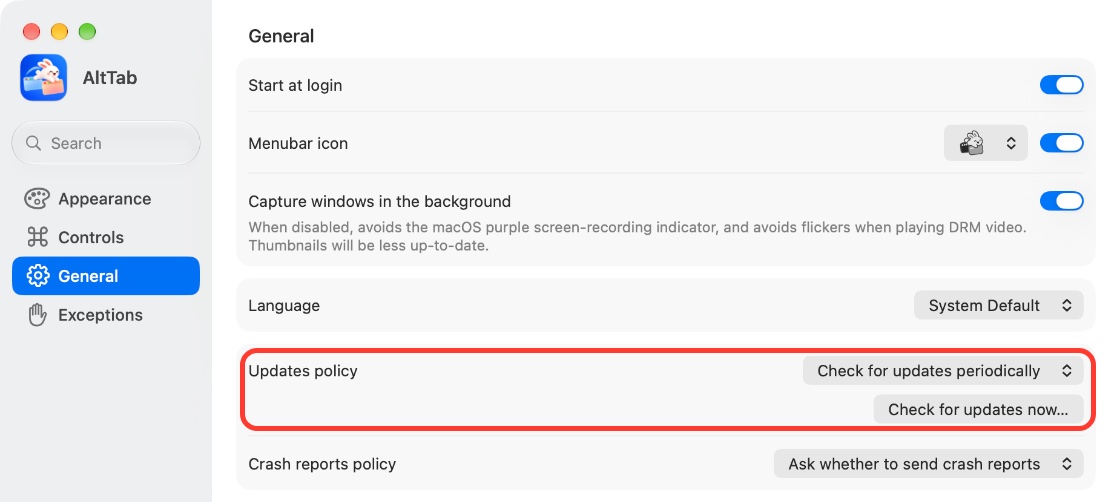
Open AltTab's settings, go to General, and click Check for updates now…. Set Updates policy to check periodically so you get fixes as they ship. Many lag problems were fixed in later versions.
2. Quit and reopen AltTab
Quit AltTab from its menu bar icon, then open it again from your Applications folder. This clears the slowdown that builds up over time and the stuck state after wake. If you need to do this often, you're likely on an older version, so go back to step 1.
Keep AltTab in your Applications folder. Some versions crashed on launch when it ran from somewhere else.
3. Use lighter previews
AltTab 11 has three ways to reduce preview work. Try them one at a time so you know which one helped.
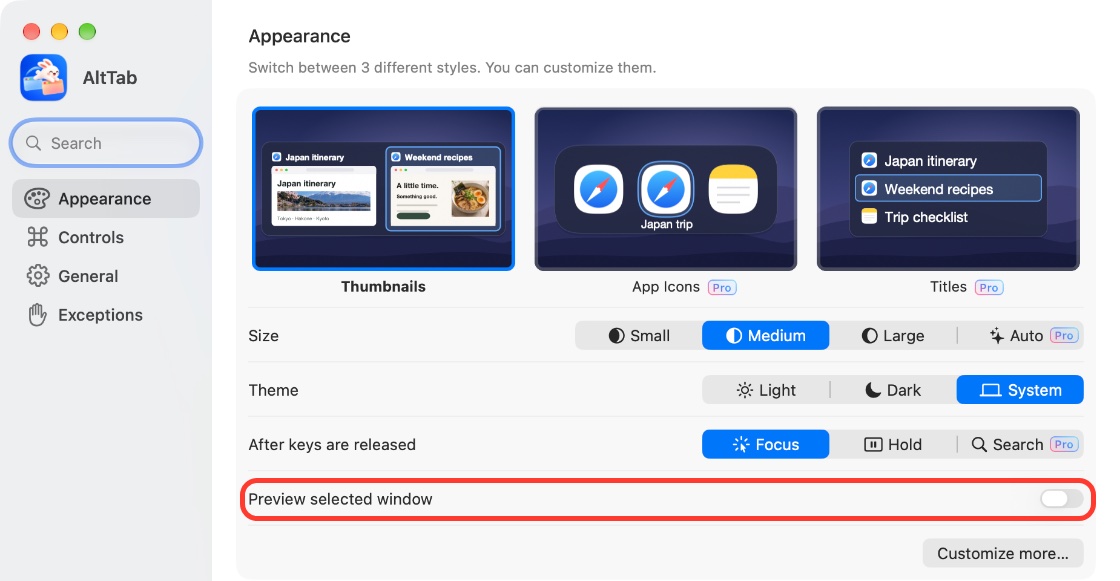
- Turn off the large preview. In Appearance, turn off Preview selected window. This removes the full-size preview of the highlighted window and keeps the thumbnails.
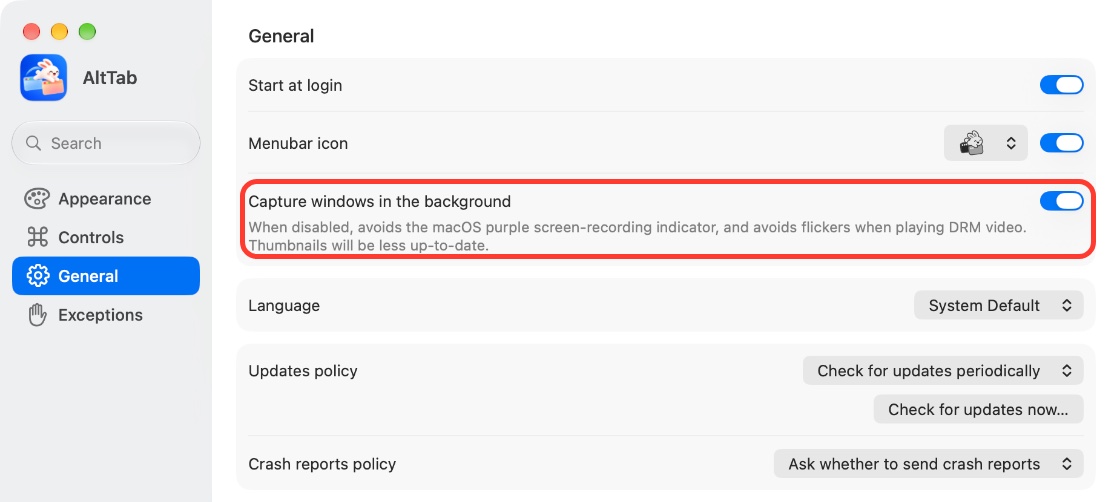
- Stop background capture. In General, turn off Capture windows in the background. AltTab's own description says thumbnails will be less up to date with it off. It also removes the purple screen recording indicator.
- Skip thumbnails entirely. Remove AltTab from System Settings > Privacy & Security > Screen & System Audio Recording. The free Thumbnails style then shows app icons instead of window images.
4. Close windows you don't need
AltTab tracks all your windows, and WindowServer slows down as the count grows. Close browser windows, Finder windows and documents you're done with, and quit apps you aren't using. Close rather than minimize, since minimized windows still add to the load. You can check WindowServer's load in Activity Monitor, in the CPU tab.
5. Test with Karabiner-Elements or BetterTouchTool quit
If you use a key remapper or a gesture app, quit it and use AltTab for an hour or so. If the delay goes away, the two apps are competing for the same key events. Try a different AltTab shortcut, or restart the remapper after your Mac wakes, which has helped some people.
6. Set a short apparition delay
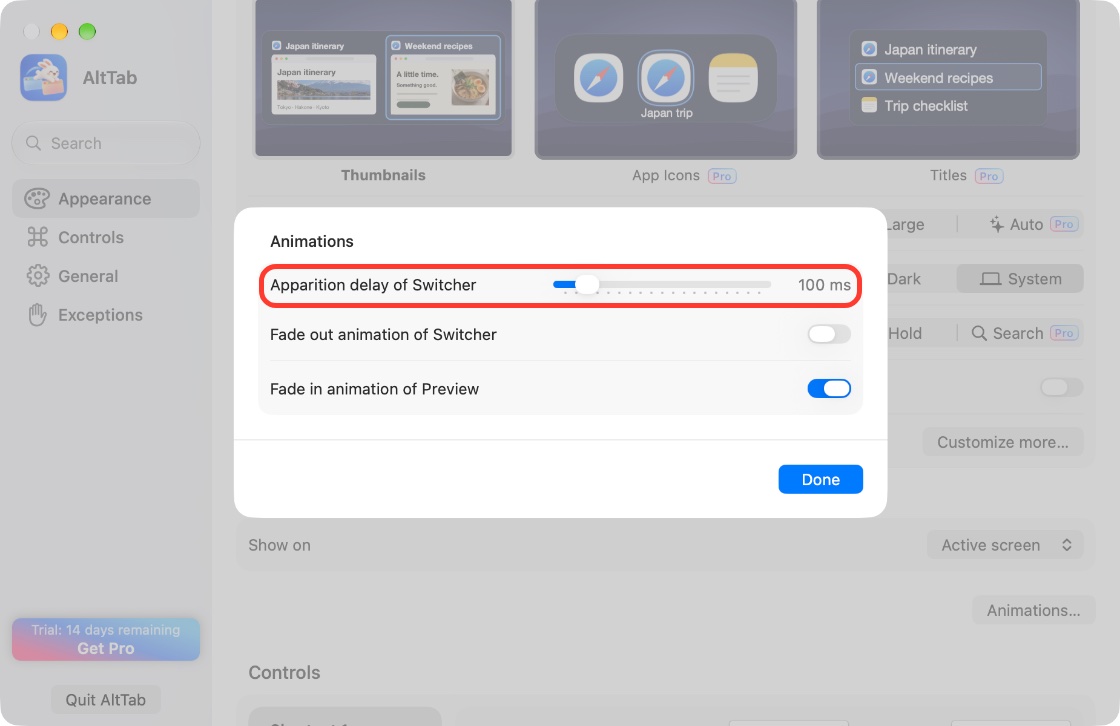
In Appearance, click Animations… and raise Apparition delay of Switcher. With a short delay, a quick tap of the shortcut switches to your last window without drawing the switcher at all. Hold the keys longer and the switcher appears as usual.
This doesn't make the switcher draw faster. It skips the drawing on quick switches, which are most switches for many people. About 200 ms is a good place to start.
7. Roll back to a version that worked for you
If the lag started with a specific update and the latest version hasn't fixed it, you can go back.
- In General, click Export settings… to save your setup.
- Download the version you want from the AltTab releases page on GitHub.
- Quit AltTab, replace it in Applications, and open it.
- In General, set Updates policy to Don't check for updates periodically so it isn't replaced right away.
Treat this as temporary. Older versions miss later fixes, including the performance work in the 11.x releases. Check AltTab's changelog now and then and move back up when your issue is listed as fixed.
What doesn't help as much as you'd think
Turning off thumbnails didn't fix it for some people. Some still had the delay with window previews off, or with window titles only. If you have a busy system or a version bug, previews are only part of it. Try fixes 1 and 2 as well.
The App Icons and Titles styles are now Pro-only. Switching to App Icons or Titles used to be a common tip for a lighter switcher. Since AltTab 11, both styles need AltTab Pro. The free route to an icon-only switcher is to skip Screen Recording, as in fix 3. Pro is $9.99 one time, or $24.99 for Pro Lifetime, with a 14-day trial.
Some of it is macOS. AltTab asks WindowServer for windows and images, and how quickly macOS answers depends on your Mac, your window count and what else is running. AltTab has cut a lot of its own overhead across the 11.x releases, but it can't make WindowServer respond faster.
If AltTab uses a lot of memory, freezes or crashes
High memory. If Activity Monitor shows WindowServer or replayd using several gigabytes, screen capture for thumbnails is a likely source. It's mostly a macOS problem, and turning thumbnails off or removing Screen Recording has stopped the growth for people who saw it. Skipping thumbnails (fix 3) is the most reliable workaround. Logging out or restarting your Mac resets WindowServer. AltTab has also fixed memory growth of its own in recent versions, so update first.
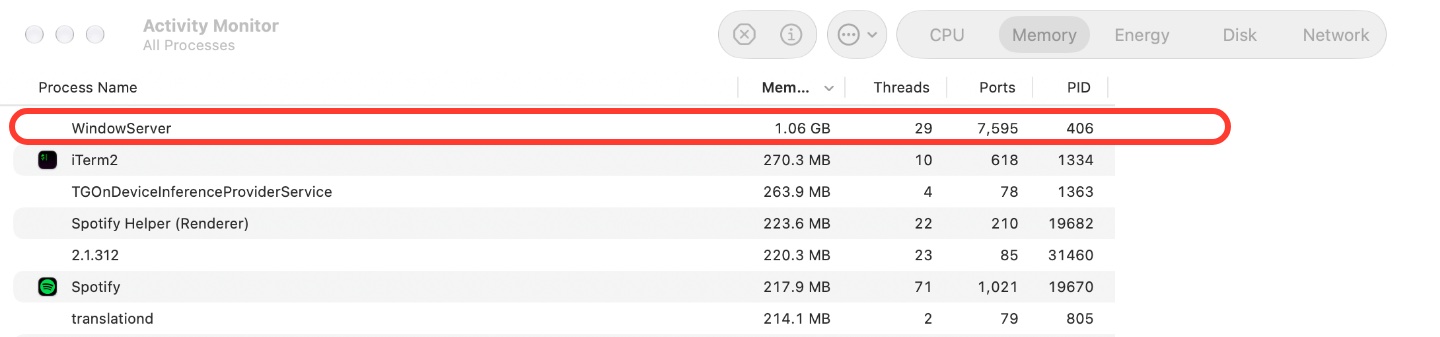
Freezes and crashes. Most crashes are tied to one version and fixed in a later one, so update first. If it still crashes, set Crash reports policy in General so reports reach AltTab's developer.
Another option: a switcher built to stay fast
If you've worked through the fixes and AltTab still lags on your setup, a different switcher is worth a try. fswitcher is a Command-Tab replacement we make that switches both apps and windows. It's built to stay fast over long sessions and with many windows open, and a quick Command-Tab tap switches to your last app or window without drawing the switcher at all. Previews are optional.
It's a paid app ($14.99 one time, with a 7-day free trial) and needs macOS 26 or later. It doesn't have search by typing, but with Instant Switching on, right Command and an app's first letter switches straight to that app. If the fixes above work for you, AltTab's free version is a good switcher to stay with. For a full side-by-side, see fswitcher vs AltTab.
FAQ
Why is AltTab slow after my Mac wakes from sleep?
Sleep and wake bugs have caused lag, blank switchers and missing windows in several AltTab versions. Recent releases include fixes for them. Update to the latest version. If it happens again, quit and reopen AltTab.
Does turning off thumbnails make AltTab faster?
It helps when the lag comes from preview load, which is common with many windows open. It doesn't help when the cause is a version bug or a busy system: some users still had the delay with previews off. Update and restart AltTab as well.
Is the App Icons style still free in AltTab?
No. Since AltTab 11, the App Icons and Titles styles need AltTab Pro. In the free version, if you don't grant Screen Recording permission, the Thumbnails style shows app icons instead of window images.
Why does AltTab get slower until I restart it?
Older versions had bugs that made AltTab slower the longer it ran. Recent versions fixed them, so update. If it comes back, quitting and reopening AltTab clears it.
Does Karabiner-Elements slow down AltTab?
Possibly. Some users with Karabiner-Elements or BetterTouchTool saw long delays, and restarting Karabiner after wake helped some of them. Others saw the same delay without either app. Quit the remapper for an hour to test.
Is the native Command-Tab faster than AltTab?
The built-in switcher is quick, but it switches apps, not windows, and doesn't show thumbnails. If you mostly need to move between windows of the same app, see how to switch windows of the same app on a Mac.