 fswitcher
 › Guides
AltTab for Mac not showing all windows, or showing closed ones
AltTab can get its window list wrong in two ways. A window that's open on your screen doesn't appear, or a window you already closed still shows up, often as a blank thumbnail. Both have known causes, and most cases come down to an update, a setting or a restart.
If a window is missing:
- Update AltTab. Several 2026 releases fix windows missing after wake, right after an app launches, and when apps open, hide or quit windows.
- Quit AltTab and open it again. This brings missing windows back.
- Check your shortcut's filters. "Visible Spaces" leaves out other desktops, and "Screen showing AltTab" leaves out your other displays.
If closed windows still show:
- Update AltTab. Recent releases fix closed and invisible windows that stay listed.
- Quit the app that leaves the ghost, then quit and reopen AltTab.
- Add that app to Exceptions if it keeps happening.
Checked , against AltTab 11.10.1 (released October 23, 2026, and still the latest) on macOS 27. Setting names match that version.
Find your symptom
Find the row that matches what you see, then start with that fix.
| What you see | Likely cause | Start with |
|---|---|---|
| A window is missing after your Mac wakes from sleep | AltTab missed the window while the Mac slept | Fix 1, then fix 2 |
| Windows are missing right after login or a restart | The windows opened before AltTab was watching | Fix 3 |
| A full-screen window is missing | Full-screen windows restored at launch are easy to miss | Fix 2, then fix 5 |
| Only windows on one display show | The screens filter is set to "Screen showing AltTab" | Fix 4 |
| Windows on other desktops don't show | The Spaces filter is set to "Visible Spaces" | Fix 4 |
| Only one window per app shows | Group apps is set to one window per app | Fix 6 |
| Only one tab per browser window shows | Group tabs lists each window once | Fix 6 |
| A Zoom, Arc or other app's window is missing | The app doesn't set that window up as a standard window | Fix 7 |
| A closed window still shows, often blank | macOS or the app left an invisible window behind | Ghost fix 1, then 2 |
First, check that the window really exists
Before you change any settings, take 30 seconds to see whether macOS knows about the window.
- Open Mission Control. Press Control-Up Arrow, or swipe up with three fingers. It shows the windows on the current desktop. If the window is there, it exists and AltTab is the one missing it.
- Press Command-Tab. If the app shows in the built-in switcher but not in AltTab, AltTab lost track of it, or one of its filters hides it.
- Look at the app's Window menu. With the app in front, its Window menu lists its open windows, including minimized ones.
Mission Control leaves out minimized windows and the windows of hidden apps, and shows other desktops only as small thumbnails at the top. If the window is minimized, select the app in Command-Tab, hold Option, and let go of Command first: the minimized window comes back. Our guides on minimized windows and Command-Tab jumping to another desktop cover those cases.
Why open windows go missing from AltTab
AltTab builds its list from what macOS tells it. When an app opens a window, macOS passes that event along, and AltTab adds the window. A window goes missing when AltTab doesn't get that message in time, or when the window isn't set up the way AltTab expects. It can also be in the list and hidden by one of your settings.
- 1The window opened before AltTab was listening: at launch, at login, or restored in full screen.
- 2The change happened during sleep or wake, and AltTab missed it.
- 3The app doesn't set the window up as a standard window, so it isn't treated as one.
- 4The window is in the list, but your shortcut's filters hide it: Spaces, screens, minimized, hidden, full screen or grouping.
Timing after launch, sleep and wake. Windows that exist before AltTab starts listening can be missed, and so can changes during sleep. AltTab's 2026 releases fix several of these cases: windows missing after waking up (11.6.1), missing or leftover windows when apps open, hide or quit (11.7.1), and a window opened right as its app launched (11.9.0). On an older version, these windows stay missing until you restart AltTab.
Full-screen windows restored at launch. A full-screen window sits on its own Space. When an app reopens one at launch, it doesn't always send the usual "new window" message. AltTab's developer explains that macOS has no public way for apps to list windows on other Spaces, so AltTab relies on private macOS interfaces to find them. Relaunching AltTab usually brings these windows back. Version 11.6.1 also fixed a window that could disappear after leaving full screen.
Your own filters. Each AltTab shortcut can show windows from all Spaces or only visible ones, and from all screens or only the screen showing the switcher. It can also hide minimized windows, full-screen windows and the windows of apps you hid with Command-H, and group an app's windows or tabs into one entry. With a laptop and an external display, "Screen showing AltTab" lists only the windows on the screen where the switcher appears. That looks like missing windows, but the setting is doing its job.
Apps that set up windows in unusual ways. AltTab only lists windows that look like windows to macOS. In the words of AltTab's developer: "It doesn't report windows, if those windows are not detectable as windows, at the technical levels." Reports over the years have named Arc, Zoom meeting windows, some Electron apps and Java apps. AltTab has added fixes for some of them, but for most the fix has to come from the app's developer.
How to fix missing windows
Work through these in order. The first two are quick and fix many cases.
1. Update AltTab
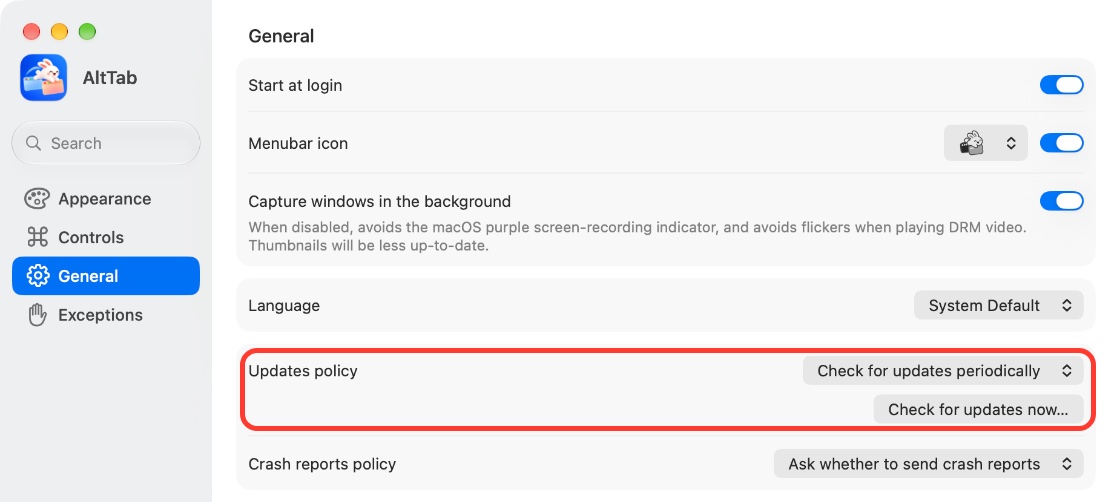
Open AltTab's settings, go to General, and click Check for updates now… to install the latest version. On October 30, 2026 the current version was 11.10.1. Releases since August 2026 fix this exact problem more than once, starting with 11.5.0, which lists "a window might be missing from the list" as fixed. If you're on an older version, start here.
2. Quit AltTab and open it again
Click Quit AltTab at the bottom of its settings window, or quit it from its menu bar icon, then open it again from Applications. AltTab looks at all current windows again when it starts. It's the fix most people rely on, and it's temporary if a bug brings the problem back after the next sleep.
If it keeps coming back on the latest version, note when it happens, for example after wake or after plugging in a display. That's what the developer needs in a bug report. If missing windows come with a slow or laggy switcher, see AltTab for Mac slow or lagging, since restarts and updates fix both.
3. Open AltTab after your apps, not before
If windows go missing mainly after a restart, especially full-screen windows, quit and reopen AltTab once your apps have opened their windows. AltTab then finds them all at once instead of waiting to hear about each one.
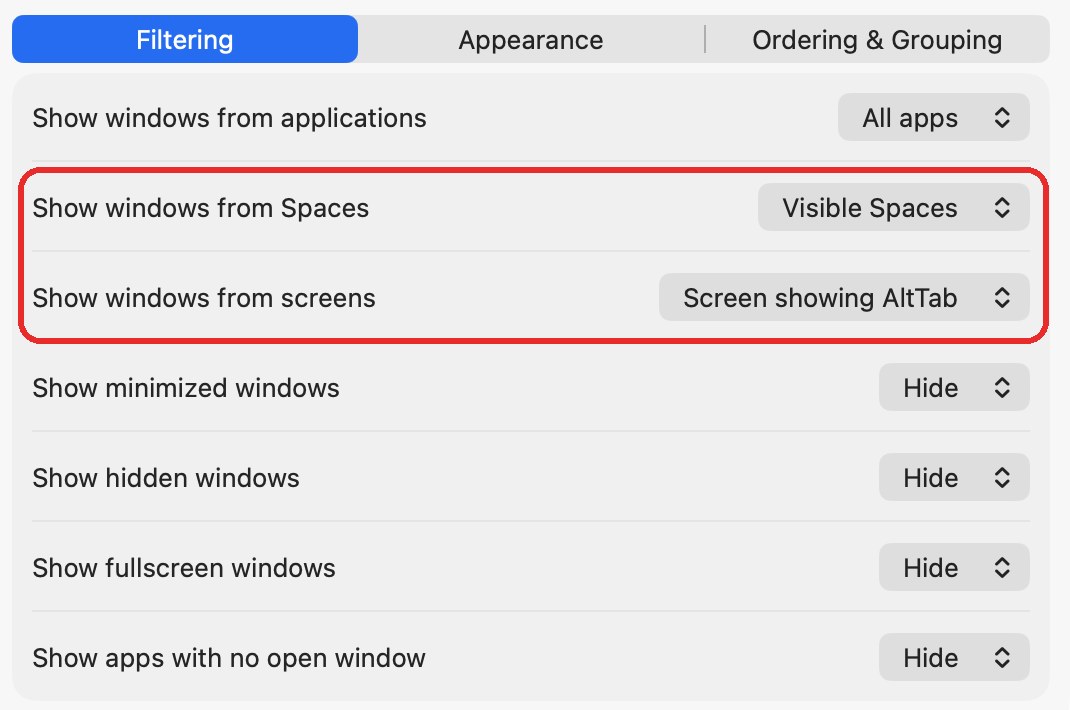
4. Check the Spaces and screens filters
Open AltTab's settings, go to Controls, select the shortcut you use, and open the Filtering tab.
- Show windows from Spaces: "Visible Spaces" leaves out windows on other desktops. Choose All Spaces.
- Show windows from screens: "Screen showing AltTab" leaves out windows on your other displays. Choose All screens.
Each shortcut has its own filters, so check every shortcut you use.
5. Check the other filters on the same tab
The rows below decide whether minimized windows, full-screen windows and the windows of hidden apps appear. Show hidden windows means windows of apps you hid with Command-H. If Show minimized windows, Show hidden windows or Show fullscreen windows is set to Hide, those windows will look missing. Set them to Show, or Show at the end to list them after your other windows. Also check that Show windows from applications is set to All apps.
6. Check Group apps and Group tabs
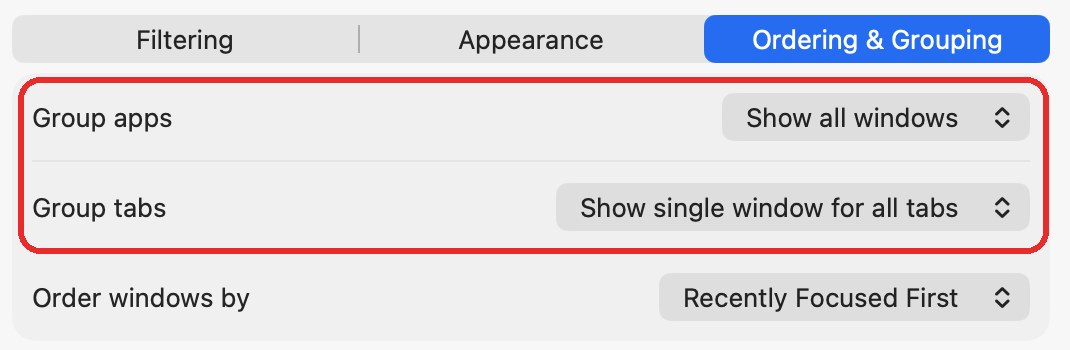
Open the Ordering & Grouping tab next to Filtering.
- Group apps: "Show one window per app" lists each app once. Choose Show all windows to see every window.
- Group tabs: "Show single window for all tabs" lists a browser or Finder window once, however many tabs it has. Choose Show separate window for each tab if you want each tab as its own entry.
Listing tabs separately can add entries you don't expect, so if ghost windows appear afterwards, switch Group tabs back.
7. Update or restart the app whose window is missing
If one app's windows go missing and others are fine, update that app and quit and reopen it. If it continues, report it to the app's developer, since AltTab can only list what looks like a window to macOS.
Why closed windows still show up (ghost windows)
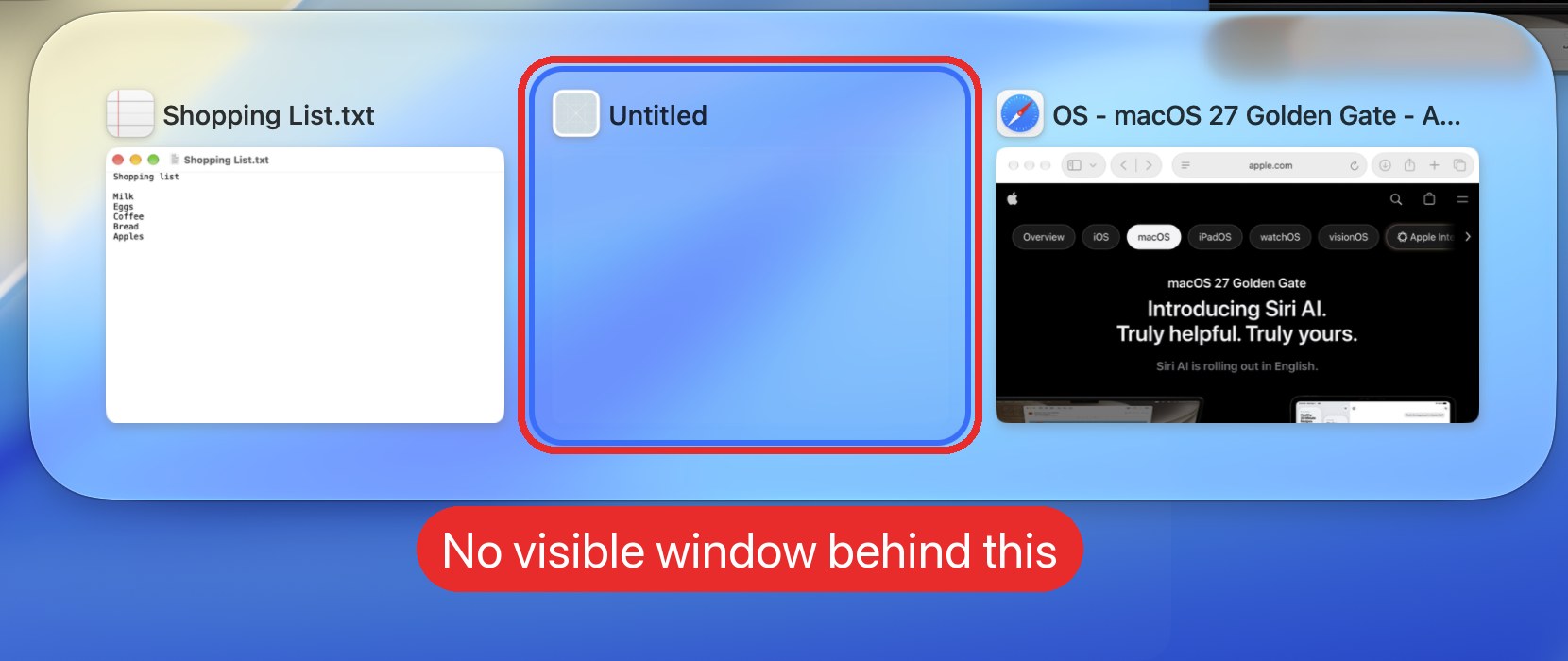
A ghost window is an entry in the switcher with nothing behind it. You pick it and nothing happens, or the app comes forward with no window. The thumbnail is often blank.
There are two sources.
macOS leaves a dead window behind. Some windows stay registered after they close. AltTab's developer calls these zombie windows and describes them as "a bug from macOS, not a bug from AltTab". AltTab removes them where it can, and several releases improve how it spots them, including 11.3.1, 11.4.4 and 11.6.0, which fixed "a closed window may linger in the switcher".
An app keeps an invisible window open. Some apps create hidden or transparent windows for reminders, quick-access panels or background tasks. Most apps don't, and reports name a handful: Outlook's reminder window, Qobuz, Joplin, LibreOffice, 1Password's quick access, Dropbox, Microsoft Teams and Slack. Filtering these out is tricky, because video players and other apps use transparent windows for real reasons. AltTab 11.6.0 fixed "invisible windows may be listed in the switcher", and 11.9.1 fixed closed Slack and Joplin windows that stayed listed briefly.
Ghost windows became more common for some users with AltTab 10.10.0, which started listing more of the windows apps create. Reports dropped with the 11.x releases, though some users still see them with specific apps.
How to get rid of ghost windows
1. Update AltTab
The 11.x releases include several rounds of fixes for leftover windows. Check that you're on the current version, as in fix 1 above, before changing settings.
2. Quit the app that leaves the ghost
If one app is the source, quitting it clears its leftover windows. Then quit and reopen AltTab. In one report, quitting Finder was the only thing that cleared stale Finder windows. You can restart Finder from the Apple menu: choose Force Quit, select Finder and click Relaunch.
3. Show one entry per window, not per tab
If ghosts appear for browser or Finder tabs, go to Controls, Ordering & Grouping, and set Group tabs to Show single window for all tabs, as shown in fix 6. Tabs no longer get their own entries, but each window still shows.
4. Add the app to Exceptions
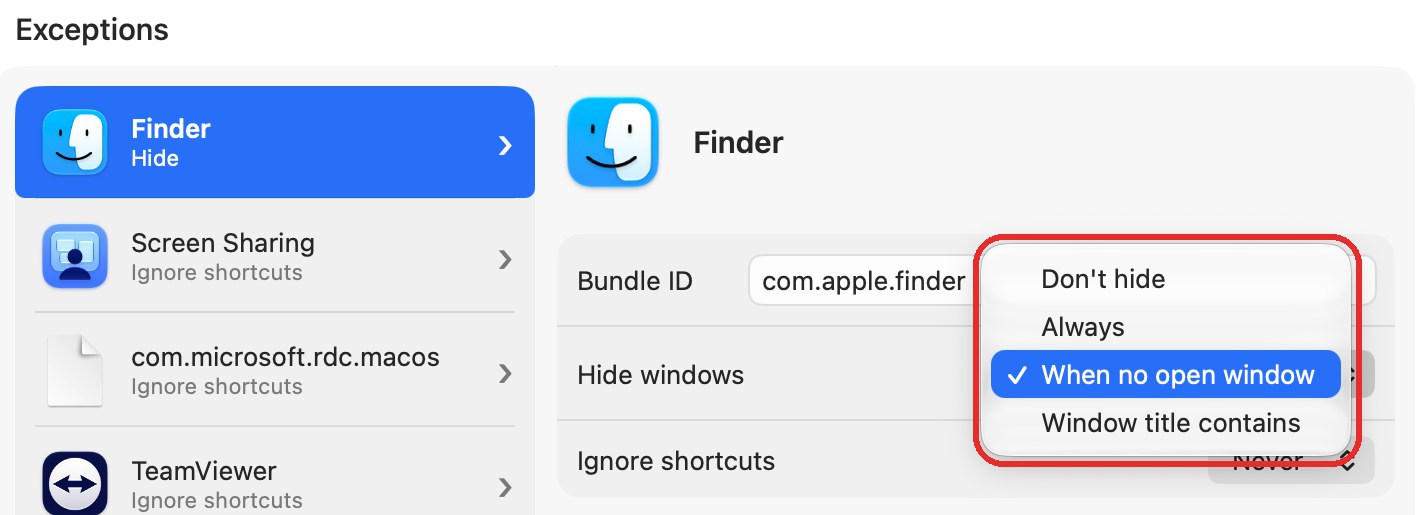
Open Exceptions in AltTab's settings, click +, and choose the app. Then set Hide windows to one of these:
- Window title contains hides only windows whose title contains the text you enter, for example a reminder window. The app's other windows still show.
- Always hides all of the app's windows from AltTab, real ones included.
5. Hide apps with no open window
Some entries that look like ghosts are apps with no open window. By default AltTab lists them at the end of the switcher, and picking one brings the app forward with no window. To remove them, go to Controls, Filtering, and set Show apps with no open window to Hide. For one app only, add it to Exceptions and set Hide windows to When no open window. Some users found ghosts much less frequent with this, though not for every app.
6. Narrow the Spaces and screens filters
Some ghost windows aren't on any real display. Users have hidden them by setting Show windows from screens to "Screen showing AltTab", or Show windows from Spaces to "Visible Spaces". This is the reverse of the missing-windows advice above: it also hides real windows on your other displays or desktops. Only use it if ghosts bother you more than seeing everything in one list.
After a macOS update
Each major macOS release changes how windows behave, and window switchers often need an update to catch up. After macOS Tahoe 26 came out, users reported blank thumbnails, especially with Stage Manager, until AltTab shipped fixes. For macOS 27, AltTab's 2026 releases fixed wrong windows listed during Mission Control (11.7.0) and a switcher that could fail to appear (11.8.0).
If your list breaks right after a macOS update:
- Update AltTab first. Fixes for a new macOS often follow soon after its release.
- Quit and reopen AltTab.
- Check AltTab's permissions: click its menu bar icon and choose Check permissions…. If one is off, turn AltTab back on in System Settings > Privacy & Security, under Accessibility or Screen & System Audio Recording, then quit and reopen AltTab.
When the problem is the other app
AltTab can only list what macOS reports as a window. If one app's windows go missing or show up as ghosts while other apps are fine, the cause is often that app's window code. AltTab's developer has closed several reports for this reason.
If you report it, to AltTab on GitHub or to the app's developer, include:
- Your AltTab version and macOS version
- The app and its version
- When it happens, for example after wake, after connecting a display, or at random
- Whether quitting and reopening AltTab fixes it
The more specific the steps, the more likely someone can reproduce it. Many of these issues were closed because nobody else could make them happen.
Trying a different switcher
If you've worked through these steps and the gaps keep coming back with the apps you use, it may be worth testing another switcher with those apps. fswitcher is a Command-Tab replacement we make for macOS 26 or later that switches both apps and windows. It groups windows by display, desktop and full-screen app, and puts apps with no open windows in their own row. Minimized windows show in its switcher, and switching to one brings it back.
It has a 7-day free trial, so you can see how it handles your problem apps before you pay. For a side-by-side, see fswitcher vs AltTab.
FAQ
Why does AltTab show a blank window that isn't open?
That's a ghost window. Either macOS kept a closed window registered, or an app has an invisible window open in the background. Update AltTab and quit the app that leaves it. If one app keeps doing it, add it to Exceptions.
Why does AltTab lose windows after my Mac wakes from sleep?
AltTab can miss window changes around sleep and wake. Releases in 2026 fixed several of these cases, so update first. Quitting and reopening AltTab brings the windows back right away.
Is this a bug in AltTab or in macOS?
It can be either, or the other app. Missing windows after wake or launch were AltTab timing problems that later releases fixed. AltTab's developer describes zombie windows as a macOS bug, and some ghost windows come from apps that keep invisible windows open.
Why is a Zoom or Arc window missing from AltTab?
Some windows aren't set up as standard windows, so AltTab doesn't treat them as windows. Update the app and AltTab. If it continues, report it to the app's developer.
Why does AltTab only show windows from one screen?
Your shortcut's screens filter is likely set to "Screen showing AltTab". In Settings, open Controls, select the shortcut, and set Show windows from screens to All screens on the Filtering tab.
Does AltTab Pro fix missing or ghost windows?
No. Window detection fixes ship in the regular releases. Pro adds search, extra styles, Auto Size and additional shortcuts.
Does the native Command-Tab have this problem?
Command-Tab lists apps, not windows, so it doesn't miss single windows the same way. If an app shows in Command-Tab but not in AltTab, AltTab lost track of it. To move between windows of the same app without AltTab, see how to switch windows of the same app on a Mac.
Related guides
- AltTab for Mac slow or lagging
- fswitcher vs AltTab
- Command-Tab doesn't restore minimized windows
- Command-Tab jumps to another desktop, or shows no window
- Command-Tab switcher shows on the wrong monitor
- Switch between windows of the same app on a Mac
AltTab is an open-source project, and fswitcher is not affiliated with it. Details about AltTab are described to the best of our knowledge as of November 2, 2026, from AltTab 11.10.1, its release notes and its GitHub issues, and may have changed since; see alt-tab.app for current details.